
A guest arrives at your spot for the first time. Their booking and forms may already be complete, but they still need to know where to change, who will teach them and where the next session starts. Good onboarding makes that first visit personal and gives the guest a clear next step.
Allow 15 to 20 minutes for a personal introduction as a starting point. This is our process recommendation, not a measured benchmark. Large groups, multiple languages and individual questions need more time. One person leads the welcome; group orientation can be shared while personal details and payments are handled individually.
Prepare three practical ways to check in
- The guest’s own device: Open the intended link or QR code from the booking email. Guests may complete details before arrival. A completed form and physical arrival are different facts.
- A self-service kiosk: Prepare the enabled terminal, language selection, camera and visible help route. Check that it returns to the start screen after each guest.
- The office: Open the right booking and person together, check details and help complete the available check-in flow. Keep this route available for guests who prefer not to use a phone.
TIDEFORCE supports these routes depending on the centre’s setup. Rehearse the actual QR and kiosk flow with your team before introducing it to guests. An account or app installation should not become a barrier to the first day. Explore the guest experience.
A personal introduction in six steps
- Welcome and resolve open points. Greet the guest by name, check the booking and communication route, and ask what they need for a good start. Clarify and, where possible, settle outstanding payments now. Record any agreed exception with the amount, owner and next step.
- Show the spot. Point out toilets, changing rooms, equipment collection and return, the bar or meeting area, important spot rules and where to get help. This does not replace the session’s technical safety briefing.
- Introduce the people. Briefly introduce the instructor and key office contacts. A name and a face are more useful than “just ask someone”.
- Make the next step specific. Explain the time and meeting point of the next session, what to bring and where the day’s plan and changes can be found.
- Explain key participation terms. Select the points that matter to your school, such as cancellation, lateness, weather changes or returning equipment. The PDF leaves blank lines for these. Answer questions and point to the full terms.
- Check understanding. Ask the guest to say where and when they meet next and where they can check changes. Resolve the last question and introduce them to the team.
Show the app once, voluntarily, using the real plan
Ask whether the guest would like to explore the app. Open their next session together and show the time, meeting point, current plan and notifications. Push notifications are optional. Important operational information must also reach guests without the app through the intended email route.
TIDEFORCE brings bookings, the personal schedule, session information and notifications together in the app and browser. An email reflects information when it was sent; the personal plan shows the current details. Explain the difference with a simple example and demonstrate only the views available in your setup. App, browser and email.
Build community through introductions and voluntary connections
A stay can feel more valuable when people know their way around and find company. Introduce guests with shared interests and show optional group activities. A visible photo and display name can help people recognise each other after a session. Sharing private contact details is never a condition of belonging.
Eligible guests and team members can manage connection requests in the TIDEFORCE community. Show the privacy choices as part of the introduction: general profile settings control details such as the full name; individual connections can receive selected contact channels, including Instagram or Facebook, and those grants can be withdrawn. A connection is not blanket access to private information. Available options depend on the enabled flow and eligible profiles.
Offer one or two relevant ways to enjoy the stay
Point to another school activity, a side activity, event or camp that fits the guest. If other scheduled teams are visible in your setup, explain how to express interest. A visible session does not mean a place is available: your team confirms level, capacity and participation through the proper booking route.
TIDEFORCE shows upcoming events, camps and tours as well as local Guidebook recommendations. Guests can also explore assigned equipment. If an active shop offer exists, it can support a useful conversation about equipment they have tried. An equipment listing does not automatically mean that item is for sale.
Clear orientation, suitable connections and reliable service can support satisfaction and repeat visits, with opportunities for future bookings and seasonal occupancy. Your own experience will show whether the approach helps; this guide promises no particular result.
Two printable pages, each useful on its own
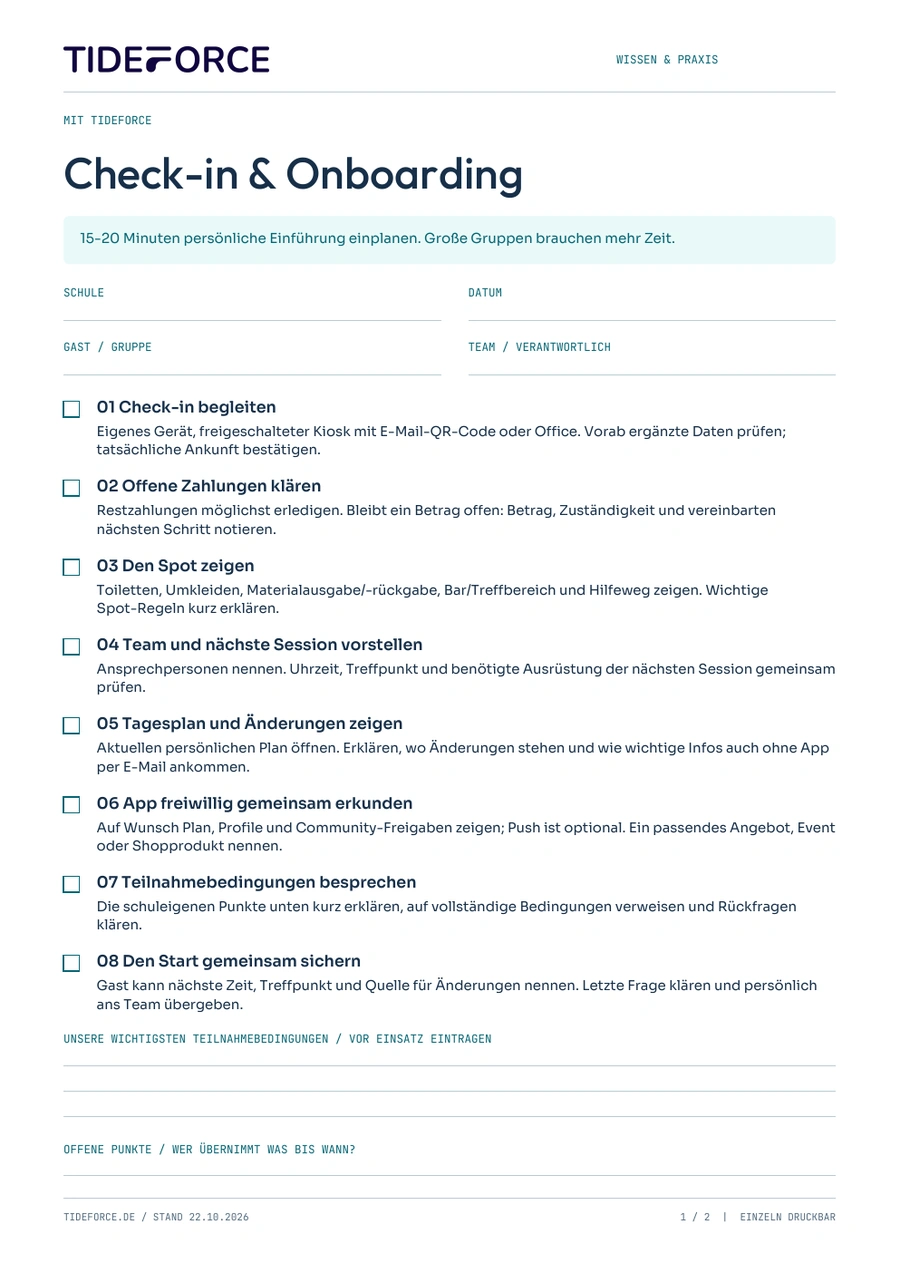
Page 1 follows onboarding with TIDEFORCE. Page 2 uses your existing booking list, payment process and daily plan. Print the page that fits. Both include guest, date and team fields, checkboxes, space for school-specific terms and open actions. The PDF is in German. Enter your email address on this page to request the guide by email. This does not subscribe you to a newsletter.
Request the check-in guide by email. Complete the journey with the checkout guide.
Try it for a week and improve one thing
Use a simple manual measure: orientation understood first time. For one week, count guests who can state the next meeting time and place and where to check changes without another explanation. Divide by all guests asked the same closing question. Record the count as “x out of y”, alongside language and individual or group arrival. This is a suggested team tally, not a promised TIDEFORCE report.
If the same misunderstanding repeats, improve that part of the introduction or signage first. Compare a similar week afterwards. Small samples, languages and group sizes limit the comparison; use it to improve the process, not to rate individual staff.
01Do guests have to install the app?
+
No. Show it as an optional aid. Operational information and the agreed route to the plan remain available without installation.
02What about large groups?
+
Allow more than the suggested 15 to 20 minutes. Share the spot tour and handle personal details, payments and individual questions separately.
03Can we use this without TIDEFORCE?
+
Yes. The second PDF page works independently with your existing booking, payment and daily planning process.
Product references checked on 22 October 2026: Guest experience & app and Customer 360. The introduction and measurement are editorial recommendations.
More practical reading: session feedback throughout the stay and all guides and updates.
Practical knowledge for every watersports school
Check-in & onboarding checklist
The checklist PDF is in German. Enter your email address to request this guide. No newsletter subscription.
- Page 1: with TIDEFORCE
- Page 2: without TIDEFORCE
- Time budget, checkboxes and space for notes
PDF · A4 · 2 pages · German
How does this work at your school?
Bring an everyday task from your school. We’ll show you how it could work in TIDEFORCE.
Request a demo →